How to Set Up a Bot to Monitor Temp Mail Inboxes Using MTEMPMAIL
How to Set Up a Bot to Monitor Temp Mail Inboxes Using MTEMPMAIL
Have you ever needed to automatically monitor a temporary email inbox without refreshing it manually or digging through test emails?
Whether you’re a developer testing verification flows, a QA engineer handling hundreds of test cases, or just someone automating sign-up flows, creating a bot to monitor temp mail inboxes can save you tons of time.
In this guide, we’ll walk you through how to build a simple monitoring bot using the API provided by MTEMPMAIL.com a fast, reliable service for generating and reading temporary emails.
Why Monitor a Temp Mail Inbox?
When testing apps that send verification codes, password reset links, or registration emails, it’s helpful to:
- Automatically detect when a message arrives
- Extract content (like OTPs or links)
- Use that content in your test flow or automation script
Instead of manually checking the inbox, a bot does it for you.
What You’ll Need
To build a basic monitoring bot, you’ll need:
- A temp mail API provider like MTEMPMAIL.com
- A scripting language (Python is great for this)
- An internet connection and basic coding knowledge
Let’s dive in.
Step-by-Step: Setting Up a Monitoring Bot
Step 1: Generate a Temporary Email Address
Make a GET request to:
https://mtempmail.com/api/v1/mailbox
This will return something like:
"email": "[email protected]",
"token": "your_unique_token"
Save the token, you’ll use it to check that inbox.
Step 2: Write the Bot (Example in Python)
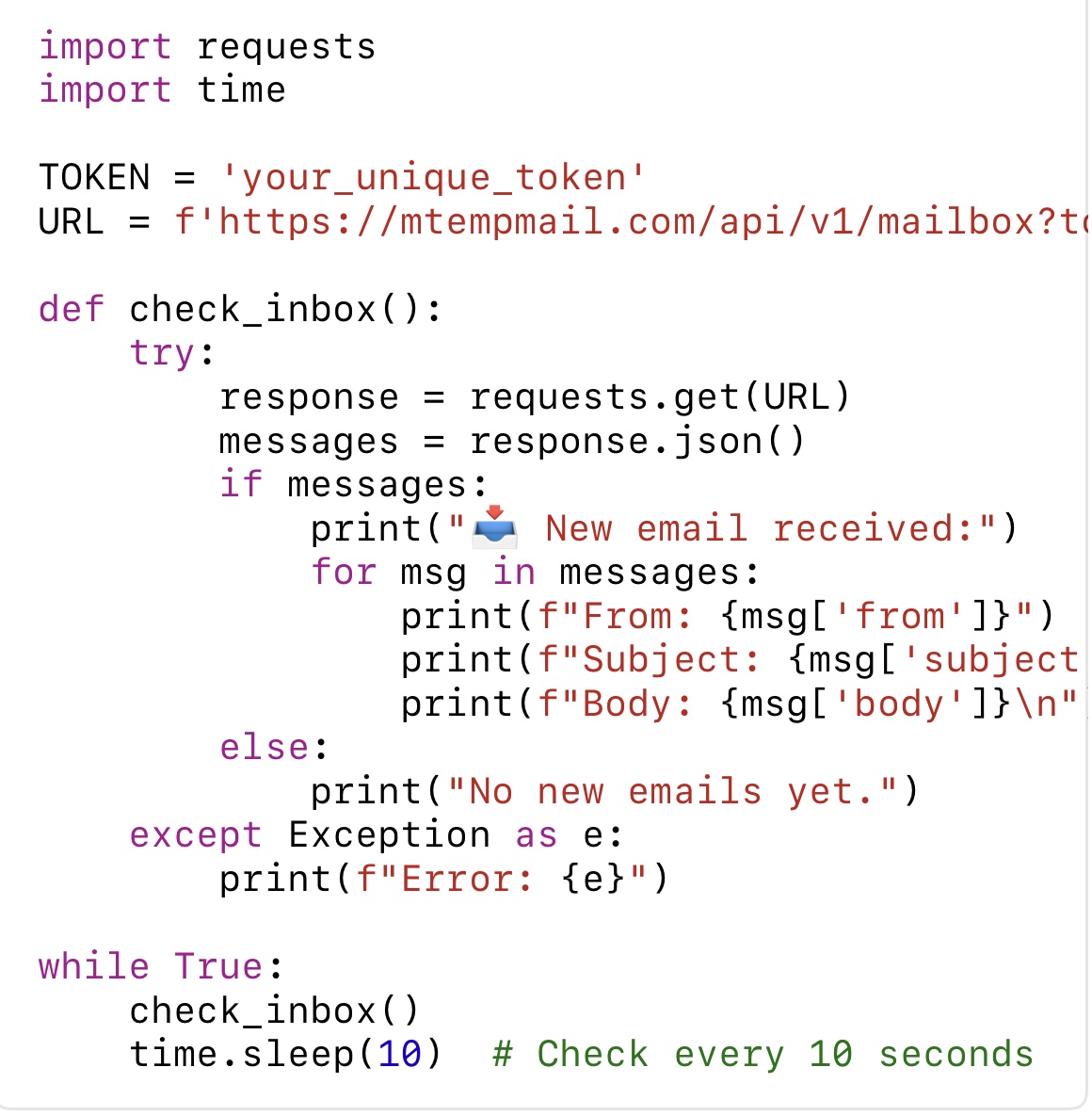
Here’s a simple Python script that checks the inbox every 10 seconds:

This bot:
- Hits the MTEMPMAIL API
- Checks for new emails
- Prints out the details
- Repeats every 10 seconds
Step 3: Customize as Needed
You can extend this script to:
- Extract verification codes using regex
- Click on confirmation links automatically
- Send alerts to Slack or Telegram
- Integrate it into a CI/CD pipeline
Use Cases for Inbox Monitoring Bots
- Automated login/signup verification
- QA automation testing
- Continuous form/email loop testing
- Trigger alerts when an email arrives
This is especially useful for companies that need to test email triggers often or simulate real user behavior.
Security Reminder
- Temp mails are public and temporary.
- Avoid using them for any sensitive data.
Your token is like a password to your inbox—keep it secure.
Final Thoughts
Building a temp mail monitoring bot is easier than it sounds—and it can seriously improve your development and testing workflow. Using the free and straightforward API from MTEMPMAIL.com, you can spin up a bot in minutes that automatically listens for new messages, extracts content, and helps power your automation.
Ready to give it a try?
👉 Visit MTEMPMAIL.com and start automating your email testing today.